

input evices (Medium) 워크시트 • 무료 PDF 다운로드 정답 키 포함
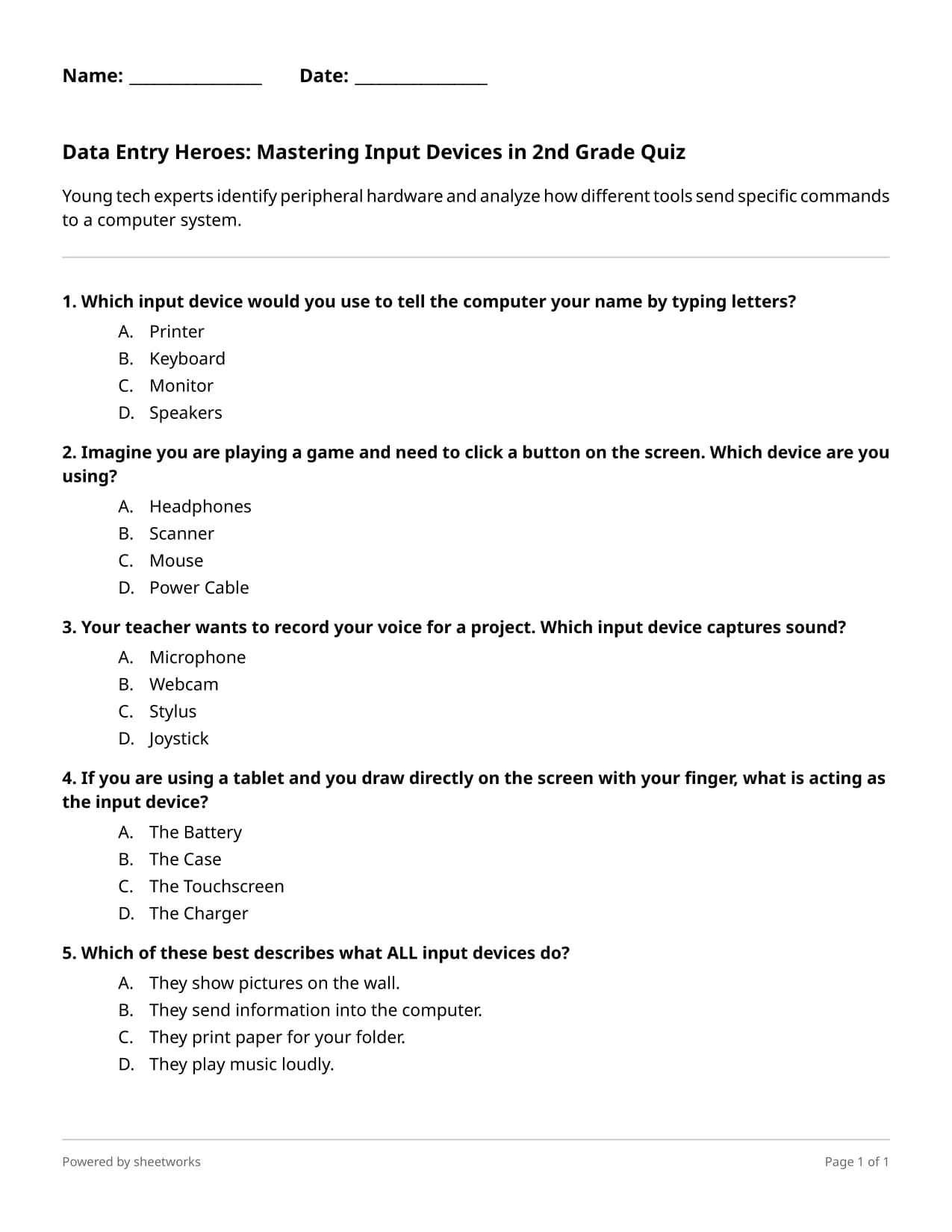
Young tech experts identify peripheral hardware and analyze how different tools send specific commands to a computer system.
교육적 개요
This quiz assesses student understanding of computer input devices and their role in human-computer interaction. The pedagogical approach utilizes real-world scenarios to scaffold the transition from concrete hardware recognition to abstract functional analysis of data entry. It is ideal for an introductory computer science unit or as a formative assessment to gauge mastery of basic digital literacy and hardware systems.
이 워크시트가 마음에 안 드세요? 한 번의 클릭으로 원하는 Arts And Other Computer Science And Technology 워크시트를 생성하세요.
단 한 번의 클릭으로 여러분의 교실 요구 사항에 맞는 맞춤형 워크시트를 만드세요.
자신만의 워크시트 생성학생들이 배울 내용
- Identify common input devices such as keyboards, mice, microphones, and touchscreens.
- Analyze the specific function of peripheral hardware in sending data and commands to a computer system.
- Distinguish between different types of input signals including text, sound, and tactile touch.
- Apply knowledge of computer hardware to solve situational problems related to data entry.
All 5 Questions
- Which input device would you use to tell the computer your name by typing letters?A) PrinterB) KeyboardC) MonitorD) Speakers
- Imagine you are playing a game and need to click a button on the screen. Which device are you using?A) HeadphonesB) ScannerC) MouseD) Power Cable
- Your teacher wants to record your voice for a project. Which input device captures sound?A) MicrophoneB) WebcamC) StylusD) Joystick
- If you are using a tablet and you draw directly on the screen with your finger, what is acting as the input device?A) The BatteryB) The CaseC) The TouchscreenD) The Charger
- Which of these best describes what ALL input devices do?A) They show pictures on the wall.B) They send information into the computer.C) They print paper for your folder.D) They play music loudly.
Try this worksheet interactively
Try it now도서관에 저장
도서관에 이 워크시트를 추가하여 편집하고 사용자 정의하세요.
자주 묻는 질문
Yes, this Computer Science Quiz is an excellent no-prep tech sub-plan because it uses clear explanations and real-world examples that students can navigate independently.
Most second graders will complete this hardware-focused quiz in approximately ten to fifteen minutes, making it a perfect quick check for understanding during a technology lab session.
This digital literacy quiz includes helpful explanations for each answer, providing immediate feedback that supports scaffolding for students who may struggle with technical terminology.
While specifically designed as a grade 2 computer science quiz, the simplified language and focus on foundational hardware makes it accessible for any lower elementary student learning about technology.
You can use this technology quiz as an exit ticket following a hands-on hardware tour to identify which students have mastered the concept of data flow from input devices.
관련 워크시트

빈칸 채우기

다중 선택 퀴즈

플래시 카드

플래시 카드 • 등급 4